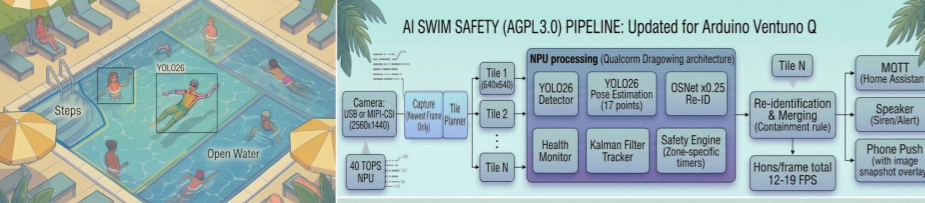
Safety note first. AI Swim Safety is an extra set of eyes, not a lifeguard, and nothing in this post changes the rule that a child near water needs an attentive adult within arm’s reach. The project says so in its own safety notice, and I will keep repeating it, because the numbers later in this post earn it.
Now, the fun part. The most important algorithm in modern computer vision is called YOLO, short for You Only Look Once. I have spent months trying to use it to guard a swimming pool, which is a job that requires looking constantly, without blinking. I put the watching job on a computer that must never get wet, running a model that has never seen the inside of a pool, to protect people who very much enjoy being in one.
Generation zero: a bug becomes a feature
The story started with a backyard pool and a plan to control smart speakers with hand gestures. Pose estimation worked wonderfully until the person was in the water, at which point the model lost its mind and returned almost nothing. Instead of fixing the bug, I wrote a blog post proposing to keep it. If a swimmer who was being tracked suddenly has no detected pose, start a timer. If the timer runs out, raise an alert. A model failure, promoted to a safety signal.
The original architecture was a classic multi-box hobby build. A tiny ESP32-S3 camera streamed frames over Wi-Fi to a Raspberry Pi 5, optionally helped by a Hailo accelerator. Frigate pulled the stream and detected people. A separate YOLOv8-pose script produced keypoints. A SORT tracker, gave each swimmer an ID, and a 60 second timer started whenever an ID lost its pose. Alerts travelled over MQTT to Node-RED, which could text a phone or trigger a siren, while Grafana drew the dashboards.

It was clever, cheap, and under $300; at the time. It was also honest about what it lacked: limited testing, and a rather generous assumption that “no pose” means “in trouble”. A swimmer who dives for a toy, a child behind an umbrella, and a person who simply walked out of frame all look identical to a model that returns nothing. The post ended with a wish list, and the last item was my favorite: consolidate everything onto a single board with an NPU.
Enter a board named twenty-one
That board arrived as the Arduino VENTUNO Q. Ventuno is Italian for twenty-one, it pairs a Qualcomm Dragonwing IQ8 processor with up to 40 dense TOPS of NPU, 16 GB of RAM, and an STM32 microcontroller, for around $299. The hardware reference has the full spec sheet.
The plan was to replace five pieces of hardware and four tools with one board and one program. That program is called AI Swim Safety, and it lives in the open at github.com/sleventyeleven/AI-Swim-Safety, under AGPL-3.0, and this post is the guided tour.
Generation one: YOLO26, a pose model, and a model that remembers faces without faces
The first working pipeline on the VENTUNO Q kept the shape of the original idea and swapped the parts. It chained three models and two pieces of logic. Here is what each one does.
- Capture. A background thread holds only the newest frame, so a slow loop drops frames instead of falling behind real time. It takes a USB webcam, an RTSP stream, a video file, or a MIPI-CSI camera.
- YOLO26 detector. The nano model from the YOLO26 family finds people and animals in a 640 by 640 letterboxed picture. It knows 80 everyday classes, including person and dog, and absolutely none called “swimmer”.
- YOLO26 pose. The pose variant adds 17 body keypoints, so the system can ask whether a face is visible. This is the spiritual heir of the original blog post, minus the part where it was the only signal.
- OSNet re-identification. A tiny model, OSNet in its 0.25 width form, turns a person crop into a 512 number fingerprint. Its job is to hand the same ID back to a swimmer who dived out of sight and surfaced, so the old ID does not keep counting toward an alarm while a “stranger” splashes around.
- Tracker. A Kalman filter plus Hungarian matching, the same family as SORT, keeps IDs steady from frame to frame and measures time in seconds rather than frames.
- Safety engine. Instead of one 60 second timer, each missing person gets a timer chosen by where they were last seen: in open water, beside the edge, at the steps, behind an umbrella, or at the edge of the picture. If unsure, it leans toward alarming.
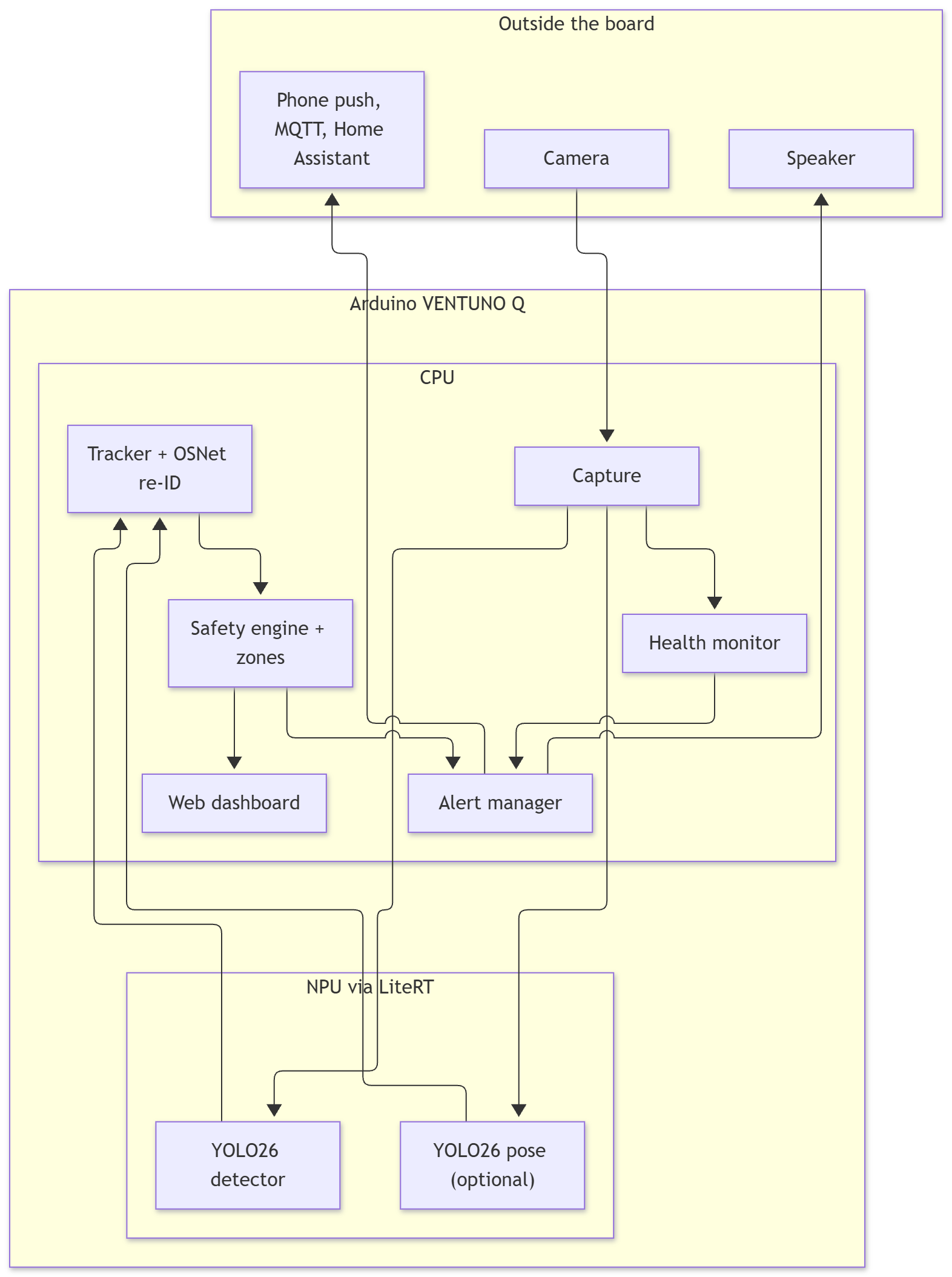
The detector and pose models run on the NPU through LiteRT with Qualcomm’s delegate, using models exported by Qualcomm AI Hub. The re-ID model runs on the CPU. The models guide explains how to build all of them, since the repository does not ship model weights.
How fast is each piece on the VENTUNO Q?
I measured each stage on the board with a real 2560 by 1440 frame, after warm-up, over dozens of runs. These are median times in milliseconds.
| Stage | Where it runs | Median | 95th percentile |
|---|---|---|---|
| Decode one 2560×1440 H.264 frame | CPU | 7.4 ms | 8.4 ms |
| Colour convert and letterbox to 640 | CPU | 1.7 ms | 1.7 ms |
| YOLO26n detector, one 640 pass | NPU | 9.0 ms | 9.4 ms |
| YOLO26n-pose, one 640 pass | NPU | 11.6 ms | 11.7 ms |
| OSNet x0.25 re-ID, per person crop | CPU | 7.2 ms | 10.0 ms |
| Tracker plus safety engine, 8 people | CPU | 0.8 ms | 0.9 ms |
| JPEG encode for the dashboard, 720p | CPU | 5.1 ms | 5.1 ms |
| For comparison: detector on the CPU only | CPU | 103 ms | 106 ms |
| For comparison: pose on the CPU only | CPU | 131 ms | 132 ms |
Two things jump out. The NPU runs the detector more than ten times faster than the board’s eight small CPU cores do, which is the whole argument for buying an NPU. And the plain bookkeeping, tracking plus the safety engine, costs less than a millisecond. The “intelligence” of watching a pool is almost entirely in how well the models see, not in the logic that counts seconds.
Add it up for generation one, a single detector pass plus, pose plus bookkeeping, and the compute is about 23 ms a frame, which is also what the project’s built-in self-test reports. In the live app, with a webcam and the dashboard streaming, I saw 12 to 19 frames per second. The rest of the gap is cameras, encoding, and Python being Python.
The plot twist: the camera shows swimmers as smudges
Generation one looked great in demos. Then I replayed real recordings from a real backyard pool through it, about two hours of them, on a 2560 by 1440 camera. The problem is simple geometry. A detector looks at 640 by 640 pixels. Shrink a 2560 pixel wide picture down to that and a swimmer’s head, which was about 50 pixels across, becomes a 12 pixel blur that the model politely declines to call a person.
The fix is humbler than a new model: cut the pool into tiles at native resolution and run the same detector on each one. In my test, the whole-frame pass found someone in 93 of 130 sampled frames near the pool, and the tiled approach found someone in 127. The cost is more passes through the detector, which on this board is the cheap part.
# how the pool region gets cut up (real output from the project's tiling planner)
plan_tiles(1150, 600, overlap=0.25, max_tiles=9)
#   3 tiles: origins (0,0) (480,0) (510,0)           a typical pool region
plan_tiles(1900, 800, overlap=0.25, max_tiles=9)
#   8 tiles: a 4x2 grid, each exactly 640x640 pixels  a larger pool
#   a hard cap keeps big frames from costing unbounded time
The new pipeline: same YOLO26, much smarter plumbing
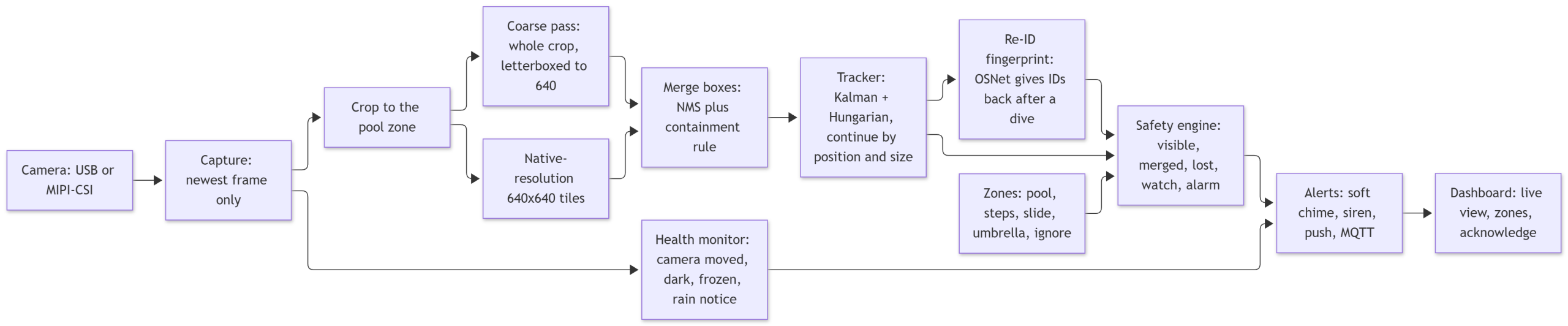
Most of what changed between generation one and generation two is the plumbing around the models. The diagram below is the full video path as it exists in the repository today.
And here is the same system drawn as components rather than steps, which is the picture to keep in your head if you want to read the code. The architecture guide walks through each box.
What the new plumbing actually does
- Duplicate boxes are merged. Two tiles sometimes draw two slightly different boxes around one small child. Plain non-maximum suppression kept both, so one child became two people and the “old” one counted down to an alarm. A containment rule fixes that.
- Groups. When two swimmers overlap, the detector often returns one box for both. A person who disappears right beside a visible neighbour is treated as being with them, for a bounded time. If the whole group vanishes together, such as a rescue that pulls both under, everyone alarms at the same moment.
- Zones for the real world. You draw the pool once, plus optional steps, slide, umbrella, and ignore areas. A slide or dive spot gets the shortest timer, because people who go down it should surface within seconds. The zones guide explains how, and why you should photograph the pool from several angles first.
- Health checks. The monitor raises a fault if the camera stalls, freezes, goes dark, or gets bumped so that the zones no longer match. A quieter notice appears in heavy rain.
- Tiered sound. A soft chime at the first sign that someone is out of sight, a siren when the timer runs out, and optional escalation for the same person alarming repeatedly. The alerts guide covers the settings.
Every one of these settings has a default, an explanation, and a way to change it. The monitor will print a fully commented config for you, and a single run can override any value.
swimsafety config template > my.yaml     # every setting, commented out, with an explanation
swimsafety config show -c my.yaml        # what the monitor will actually use
swimsafety run -c my.yaml --set safety.submerged_alarm_s=30

# my.yaml: soft first, loud when it keeps happening
alerts:
  escalate_after_alarms: 2
  escalate_after_s: 45
  sinks:
    - {type: audio, first_alarm: chime}
Performance of the new pipeline, from real tests
| Measure | Result on the VENTUNO Q |
|---|---|
| Perception, one whole-frame pass (crop, letterbox, detect) | 10.3 ms |
| Perception, tiled, 7 detector passes at native resolution | 66.6 ms |
| Perception, tiled plus pose | 78.9 ms |
| Whole system replaying 2560×1440 footage, including decode, tracking, health and events | about 11.7 frames per second |
| Memory, 19 minute sampled run | 469 MB at the start, 472 MB at the end, no growth |
| CPU use | about 2.6 of 8 cores |
| Board temperature | 45 to 47 C on the hottest sensor |
| Repeatability | the same clip replayed twice gave identical events |
Seven tiled passes cost 66.6 ms, about what seven 9 ms passes plus a little merging should cost. Nothing mysterious happens when you add tiles, which is reassuring and also slightly boring, exactly the quality I want in a safety system.
The honest part: what the numbers say about safety
Speed is the easy number. The question that matters is whether it raises alarms when it should and stays quiet when it should not. On the real recordings, nobody was in trouble, so every alarm was a false alarm. Across five clips of about 25 minutes each, the system raised roughly 65 to 160 false alarms per hour. The fixes above removed about a fifth of the false alarms I started with, which is real progress toward a number that is still far too high to be useful.
To find out why, I drew 24 alarms at random and looked at the frame at the moment each one fired. About two thirds were people still in plain sight whom the detector had stopped finding. Another 17 percent were phantoms, sun sparkle on the water that the detector briefly believed was a head. About one in five were people hidden behind a slide or a smudge on the camera cover. None were real emergencies.
# what the safety engine says, from a real replay on the board
00:24  watch  Person #3 still missing (10s): went out of sight in open water
00:39  alarm  ALARM: person #3 went out of sight in open water and has been missing 25s

# the group logic, from another run
ALARM: person #5 went out of sight in open water (together with #4) and has been missing 25s
There is good news too. Since no raw footage of a person going under existed (thankfully), I spliced six “did not surface” clips from real frames: real footage up to the moment a person was last seen near the water, then an empty pool from the same recording. All six raised an alarm, between 11 and 29 seconds after the person vanished, with a median of about 21 seconds.
All of this, including the things that did not work, is written up in the repository’s validation report. I would rather publish an embarrassing true number than a flattering vague one, especially for something that stands guard for a pool.
Where AI Swim Safety goes from here
The irony of the whole exercise is that the weakest link is not the clever part. The logic that counts seconds takes under a millisecond. The hard part is the oldest problem in the field: seeing a small head in glittering water. Three things should help, and none of them requires training a custom model for every pool. A camera mounted higher and closer, looking down across the water, is the biggest lever. A larger off-the-shelf detector on the NPU is next. After that comes the feature I most want for the people who actually use this: sending a snapshot with the detection overlaid to a phone, so a quick glance can answer “is this real?” before anyone dives into the water.
If you want to try it, the VENTUNO Q setup guide takes you from a fresh board to a running monitor, and the tuning guide shows how to change any default for your own pool. The hardware notes cover cameras and mounting. The project is AGPL-3.0, and offering setup, installation and repair services is explicitly welcome, so a neighbourhood tinkerer can help a neighbour. Issues, footage experiments, and pull requests are all welcome at the project repository.