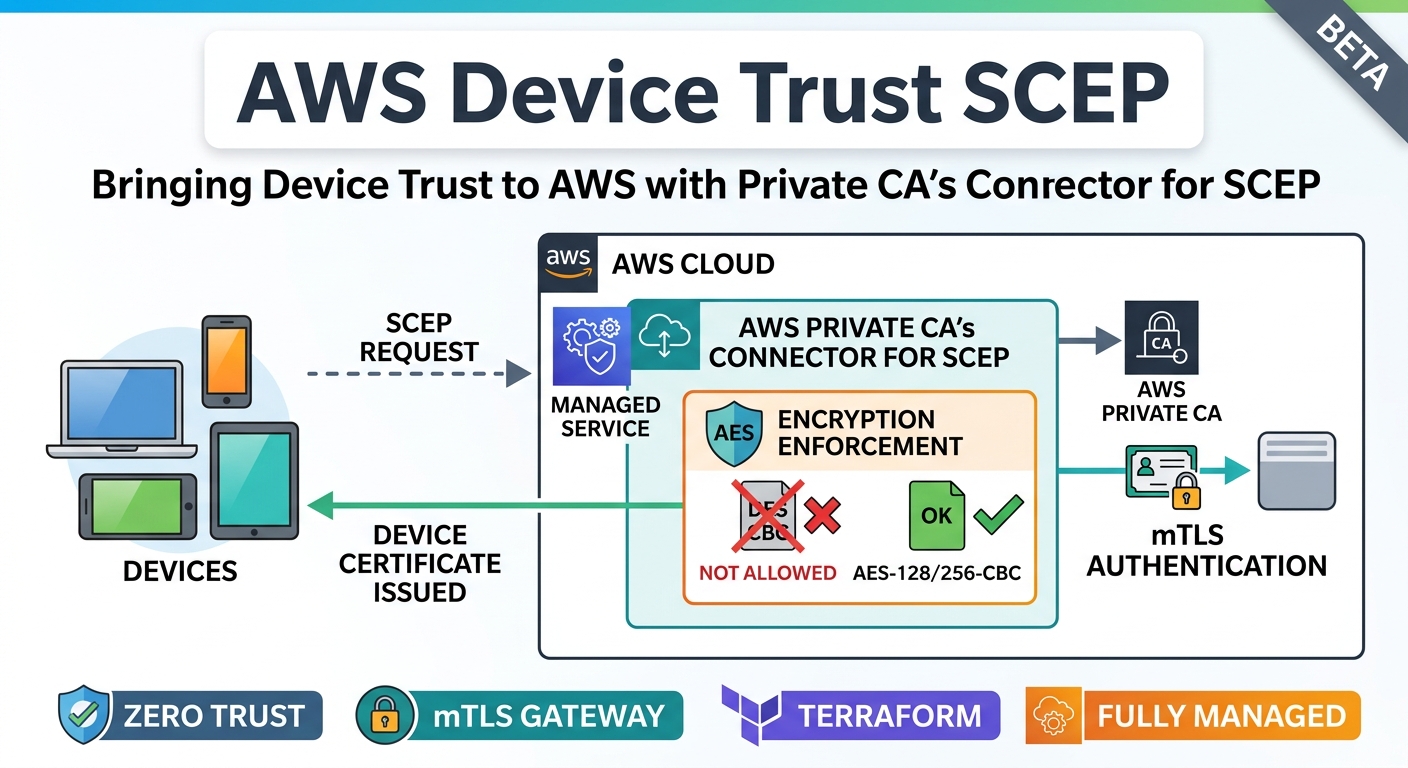
My Terraform blueprint for step-ca and Google Cloud CAS automated the certificate based device trust design I already argued for and built manually. It worked well enough that the obvious next question showed up almost immediately: what does the same design pattern look like on AWS?
This post covers that answer, and it comes with an upfront label: this is a beta, testing release. The AWS path in Device-Trust-Cloud has been deployed and enrollment-verified end to end against a real AWS account, but it hasn’t had the mileage the GCP side has, and there is one specific dependency worth understanding before you promote to production. We’ll get to that. First, the more interesting part: getting device trust working on AWS meant a genuine architecture change, not a copy-paste of the GCP design with different resource names.
The Architecture Actually Changes on AWS
The GCP build’s whole shape was organized around step-ca. step-ca ran as a Registration Authority in front of Google Cloud CAS, terminated its own TLS, and needed a Compute Engine VM/Container plus a path-restricted load balancer in front of it so only the SCEP operation was ever publicly reachable.
AWS removes that requirement entirely. AWS Private CA’s Connector for SCEP is a fully managed SCEP front end for AWS Private CA. Create a connector, get a SCEP URL and a challenge password, and AWS runs the protocol implementation, the CA communication, and the challenge enforcement itself. There is no VM to patch, no Docker container to keep current, and no custom load balancer path restriction to maintain, because AWS’s own connector already refuses anything that isn’t a SCEP operation.
That is a real architectural fork in the design, not a detail. The GCP module list includes a stepca_container module and a scep_gateway load balancer specifically to give step-ca a VM to run on and a narrow public surface. The AWS side has neither. aws/modules/connector_scep is a connector and a challenge resource, full stop.
Full Architecture
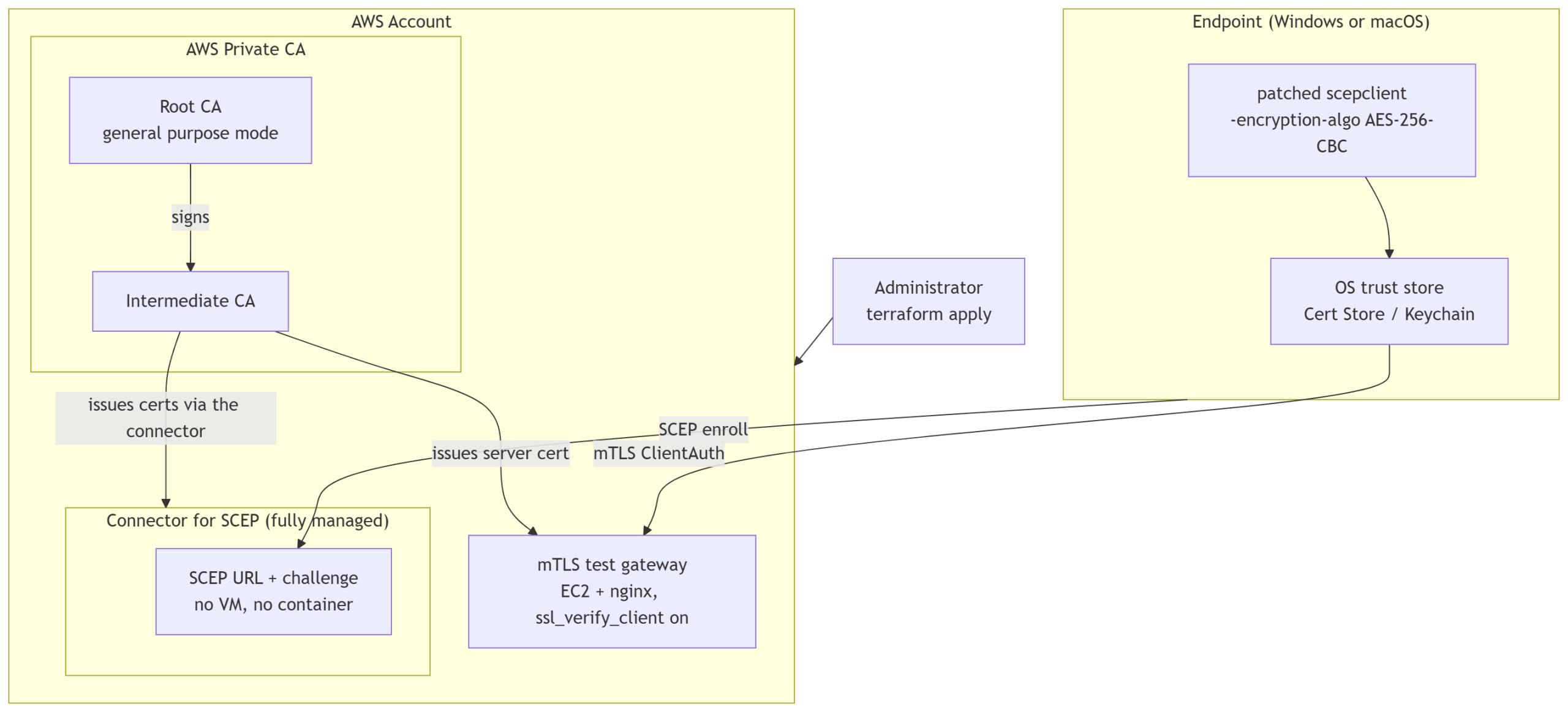
The mtls_test_gateway module carries over unchanged from the GCP side, same nginx config, same ssl_verify_client on directive, same purpose: proving an AWS-issued certificate actually works for TLS ClientAuth, not just that Connector for SCEP handed back a file. That verification step doesn’t care which cloud issued the certificate, so there was no reason to rebuild it.
The Soft Blocker: scepclient’s Encryption Algorithm
Here’s the main part that keeps this release at beta rather than general availability.
micromdm/scep‘s scepclient, the same tool the GCP install scripts already used against step-ca, hardcodes the SCEP PKIOperation request’s content encryption to DES-CBC, a single-DES cipher from the original SCEP specification. There’s no flag to change it and no negotiation against the server’s advertised capabilities. Google’s step-ca never minded. AWS’s Connector for SCEP does mind, and says so plainly:
ValidationException: Unsupported algorithm: 1.3.14.3.2.7.That OID is DES-CBC. AWS enforces a real minimum encryption standard on the SCEP protocol’s content encryption and rejects the legacy cipher outright, which is the correct security posture for a service issuing production device certificates. It just means the enrollment client has to meet that bar, and the stand-alone tool this whole project already depended on didn’t.
The fix was small in code and larger in maintenance surface: we patched a fork of micromdm/scep adding a single -encryption-algo flag (DES-CBC, AES-128-CBC, or AES-256-CBC, defaulting to DES-CBC so nothing changes for the GCP path), and the install scripts now pull scepclient from that fork’s release instead of the official one when targeting AWS. After building it, we found we weren’t the only ones who’d hit this wall: a more complete community pull request was already open upstream adding equivalent functionality, including GCM cipher modes and documentation we hadn’t gotten to yet. If it merges, the install scripts switch back to the official release and the fork goes away entirely. If it stalls, we need to keep maintaining our own release as the interim source.
Deploying From Scratch
The AWS side lives in its own Terraform root (aws/), with its own state, separate from the GCP configuration at the repository root.
git clone https://github.com/sleventyeleven/Device-Trust-Cloud.git
cd Device-Trust-Cloud/aws

terraform init
terraform plan -var="region=us-east-1"
terraform apply -var="region=us-east-1"
One step Terraform can’t automate: AWS Private CA has to explicitly share the intermediate CA with the Connector for SCEP service principal via AWS Resource Access Manager before the connector can use it. aws_ram_principal_association doesn’t support service principals, only account IDs and organization ARNs, so this is a one-time CLI step after the intermediate CA exists:
INTERMEDIATE_CA_ARN=$(terraform output -raw intermediate_ca_arn)
ACCOUNT_ID=$(aws sts get-caller-identity --query Account --output text)

aws ram create-resource-share \
  --region us-east-1 \
  --name device-trust-connector-scep-share \
  --permission-arns arn:aws:ram::aws:permission/AWSRAMBlankEndEntityCertificateAPICSRPassthroughIssuanceCertificateAuthority \
  --resource-arns "$INTERMEDIATE_CA_ARN" \
  --principals pca-connector-scep.amazonaws.com \
  --sources "$ACCOUNT_ID"
Then re-run terraform apply to create the connector itself. Verify it’s actually serving before touching an endpoint:
SCEP_URL=$(terraform output -raw scep_endpoint_url)
curl -sk -o getcacert.der -w "HTTP_STATUS=%{http_code}\n" "${SCEP_URL}?operation=GetCACert"
openssl pkcs7 -inform DER -in getcacert.der -print_certs -noout
A 200 and a printed root plus intermediate chain confirms the CA hierarchy and the connector are correctly wired together, the same search-verify pattern we used on the GCP side before ever touching a device.
Enrolling a Device
The install scripts are the same three scripts from the GCP post, install-windows.ps1, install-windows.bat, and install-macos.sh, extended rather than replaced. Point them at the connector’s URL as a complete endpoint (AWS hands back a full, ready-to-use SCEP URL) and set the encryption algorithm explicitly:
terraform output -raw root_ca_certificate > root-ca.crt

.\install-windows.ps1 `
  -ScepFullUrl "$(terraform output -raw scep_endpoint_url)" `
  -Challenge "$(terraform output -raw scep_challenge_password)" `
  -RootCaFile ".\root-ca.crt" `
  -EncryptionAlgo "AES-256-CBC" `
  -MtlsGatewayUrl "$(terraform output -raw mtls_gateway_url)"
export SCEP_FULL_URL="$(terraform output -raw scep_endpoint_url)"
export SCEP_CHALLENGE="$(terraform output -raw scep_challenge_password)"
export ROOT_CA_FILE_SRC="./root-ca.crt"
export SCEP_ENCRYPTION_ALGO="AES-256-CBC"
export MTLS_GATEWAY_URL="$(terraform output -raw mtls_gateway_url)"
sudo -E ./install-macos.sh
Expect the first enrollment attempt to report a “certificate expired” failure and then succeed automatically on the built-in retry a few seconds later. That’s the AWS-side quirk with syncing the CSR through the managed infrastructure taking about a second, not something to troubleshoot. Both scripts finish the same way the GCP versions do: a real request against the mTLS test gateway using the certificate that was just installed, printing a plain PASS or FAIL so you know the enrollment produced something usable.
What Beta Actually Means Here
To be specific about what “beta” covers and doesn’t: the Terraform, the CA hierarchy, the connector, and the mTLS verification gateway are solid, each individually verified against a live AWS account, torn down and rebuilt clean more than once during testing. What’s still settling is the enrollment client dependency described above, and the simple fact that this path hasn’t accumulated the same real-world runs the GCP side has. If you’re evaluating AWS for a pilot, this is a reasonable place to start. If you’re planning a production rollout soon, consider waiting for the scepclient dependency to resolve one way or the other first.
Full deployment detail, every AWS-versus-GCP difference, and the running list of what’s still open live in docs/aws-details.md on the aws-support branch. For the design case behind all of this in the first place, start with why certificate based device trust matters, and for the original hand-built GCP architecture this Terraform project automates, see the step-ca and Google Cloud CAS buildout. If you want the reference documentation for the AWS service itself, AWS Private CA’s Connector for SCEP documentation is where we went back to most often while building this.